Pay
smart.
On Prime, send money to any PaySimati member and pay no fee. Prime is MWK 300 for 30 days.
Licensed by the Reserve Bank of Malawi. Licence No. PSP-004/26.
Send to a member
- MWK
- Fee
- MWK
- Government levy
- MWK
- Total debit
- MWK
Prime is MWK 300 for 30 days.
Money in. Money out.
- Pay-in, by code
- In your wallet within 5 seconds of payingIn our live test, 23 November 2026
- Pay-out
- Delivered in 5 to 10 secondsIn our live test, 23 November 2026
- At an agent
- Cash-in and Cash-out, in person
The person you pay sees the money come from OneKhusa, our payments partner.
See it in the app.
Example screens
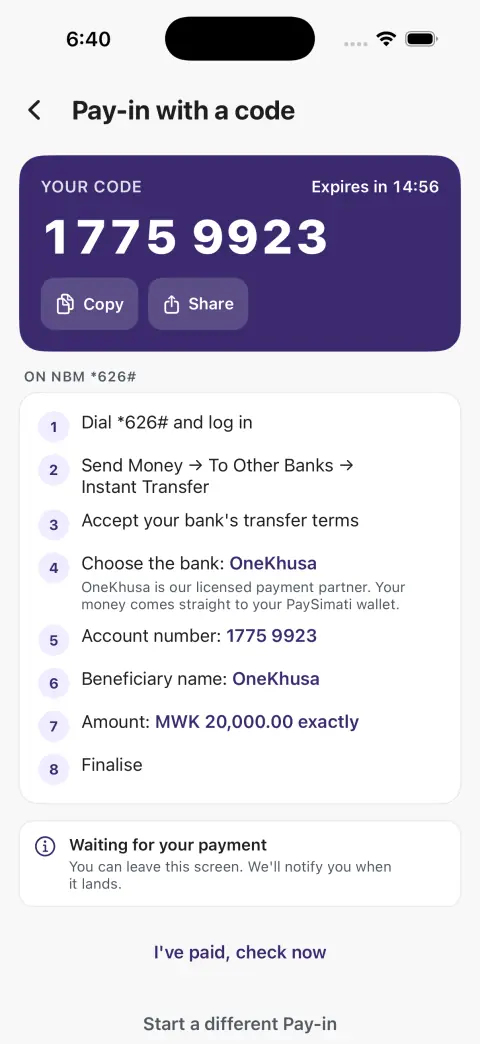
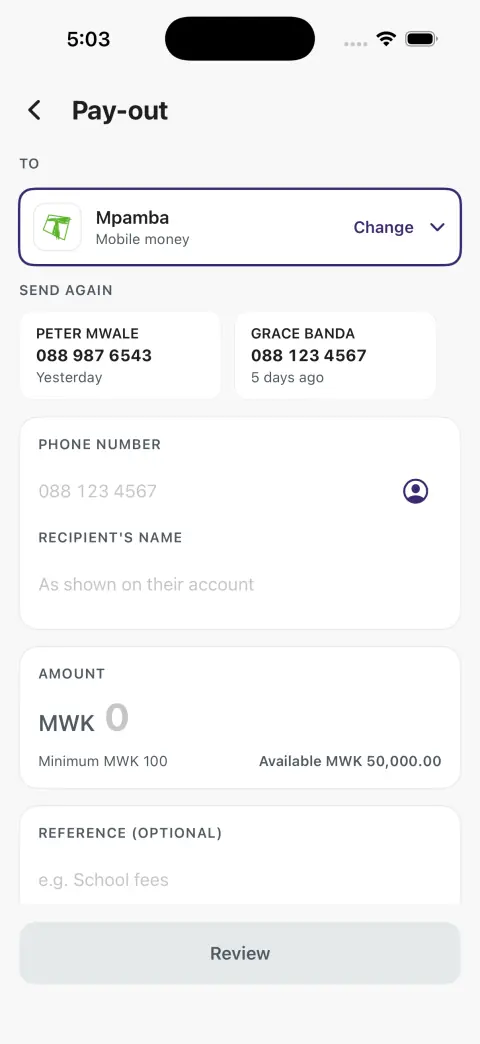
From our tests. The names, numbers and amounts are test data.
The price list.
| Go | Prime | PrimeX | |
|---|---|---|---|
| Plan, 30 days MWK | Free | 300 | 450 |
| Send to a member | 1% | Free | Free |
| Pay a merchant | 0.5% | Free | Free |
| Pay Afrimax | Free | Free | Free |
| Buy Airtel airtime bundles | Free | Free | Free |
| Cash-in at an agent | Free | Free | Free |
| Pay-in by bank deposit | Free | Free | Free |
| Cash-out at an agent | 1% | 0.75% | 0.75% |
| Send to a non-member | 2% | 1% | 1% |
These fees include VAT. Where a fee applies, it is at least MWK 20.
On Go, sending MWK 30,000 to members costs MWK 300 in fees: the price of Prime for 30 days.
Banks and mobile money
| Go | Prime | PrimeX | |
|---|---|---|---|
| Pay-in by code | 1.7% | 1.36% | 1.36% |
| Pay-out to Airtel Money or Mpamba | 350 + 1.7% | 280 + 1.36% | 280 + 1.36% |
| Pay-out to a bank | 1,000 + 1.7% | 800 + 1.36% | 800 + 1.36% |
Prime and PrimeX members get 20% off every Pay-in and Pay-out fee. A fee such as 800 + 1.36% is MWK 800 plus 1.36% of the amount. VAT at 17.5% is added to these fees.
A Pay-in fee comes out of the amount you send: your wallet receives the amount less our fee.
Example: a Pay-out to a bank of MWK 20,000 on Prime. Fee with VAT MWK 1,259.60, levy MWK 10.00, total debit MWK 21,269.60.
Pay-in by code starts at MWK 100, and Pay-out at MWK 100.
A government levy of 0.05% applies when you send or pay more than MWK 100,000, and on every Pay-out to a bank.
Prices as at 23 November 2026.
Start in four steps.
- Get the appPaySimati on Google Play. Paymaart on the App Store.
- RegisterYour ID and a live selfie. We check them before your wallet opens.
- Add money Pay in from Airtel Money, Mpamba or your bank with a code from the app, or give cash to a PaySimati agent.
- PayChoose who, enter the amount, confirm with your PIN.
The app.
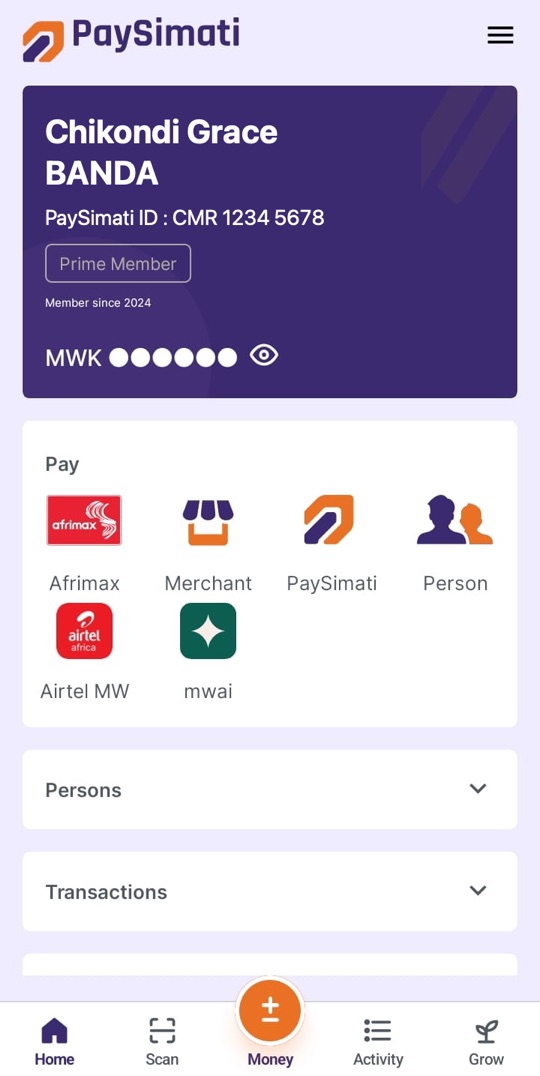
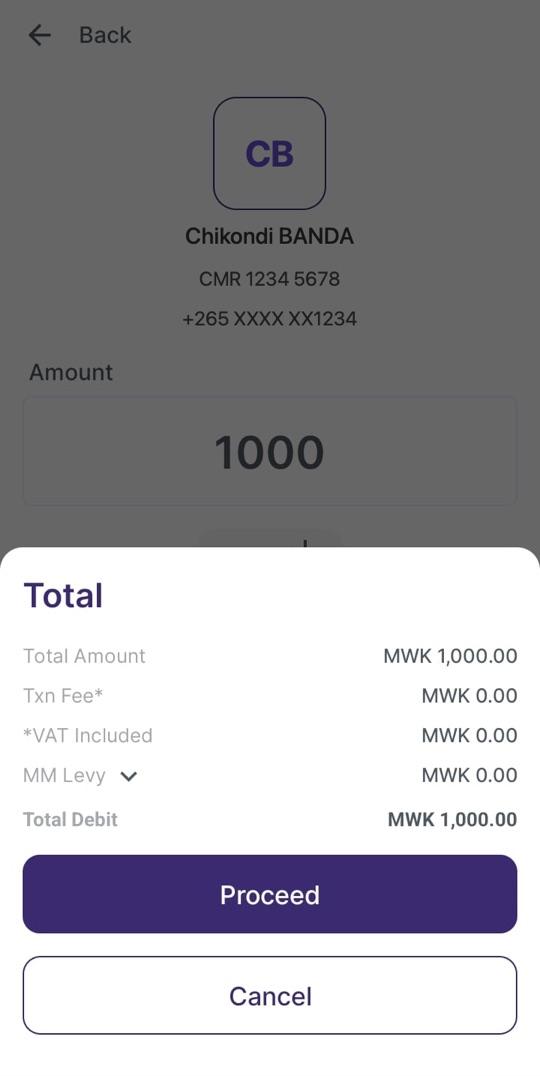
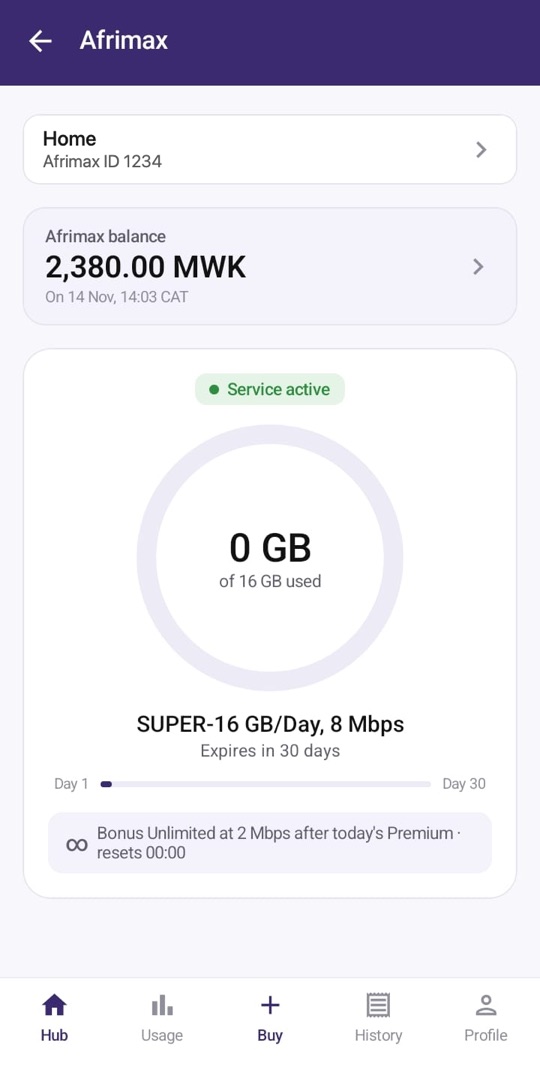
The name, ID and number on these screens are samples.
What you can pay.
- People
- By PaySimati ID or phone number. Someone who is not a member collects the cash from an agent.
- Shops
- Scan the QR code at the till.
- Afrimax
- Internet plans and top-ups. Your payment is credited to your Afrimax account. How to pay Afrimax
- Airtel
- Airtime bundles.
- mwai
- AI plans and credits, with a VAT receipt. For Prime and PrimeX members. How to pay for mwai
- Wallets and banks
- Send money to any Airtel Money or Mpamba number, or any bank account. And add money from Airtel Money, Mpamba or your bank with a code. How Pay-in works How Pay-out works
Safe, in plain facts.
- Licensed
- By the Reserve Bank of Malawi, as a Payment Service Provider. Licence No. PSP-004/26.
- Held in trust
- Every balance is matched one for one by money we hold for customers in trust accounts at First Capital Bank, National Bank of Malawi and Standard Bank, and in our account with OneKhusa.
- Yours alone
- A PIN for every payment. A one-time code by email when you sign in.
- No surprises
- The fee, the levy and the total are shown before you confirm.
We never ask for your PIN or a one-time code. Not by phone, message or email.
Three kinds of account.
- CMR
- CustomersPay, send and take out cash. Get the app
- AGT
- AgentsEarn commission on Cash-in, Cash-out and Afrimax payments. Register new customers from your phone. Become an agent
- MCT
- MerchantsA QR code for every till. Ask a customer to pay, by chat. Take payments
Every PaySimati ID starts with one of these, like CMR 1234 5678.
We collect for Afrimax and mwai.
Afrimax internet and mwai are both paid through PaySimati.
- Afrimax
- Home and business internet. Each payment reaches the customer's Afrimax account as it is made. afrimax.net
- mwai
- AI in kwacha, from Afrimax. Each payment is approved in the PaySimati app and comes with a VAT receipt. mwai.africa
Mwachidule, mu Chichewa
- PIN yanu ndi chinsinsi chanu. Musauze aliyense, ngakhale ejenti kapena munthu wonena kuti amagwira ntchito ku PaySimati.
- Sitidzakufunsani PIN yanu, kaya pa foni, pa uthenga kapena pa imelo.
- Musanatsimikize malipiro, app imakuonetsani fizi ndi ndalama zonse zimene mulipire.
- Foni kapena SIM yanu ikasowa, tiuzeni nthawi yomweyo kuti titseke akaunti yanu: imbani kapena tumizani uthenga pa WhatsApp ku +265 88 270 0900.
- Ndalama za makasitomala zimasungidwa m'maakaunti a trust ku First Capital Bank, National Bank of Malawi ndi Standard Bank.
- PaySimati ndi ya AfrimaxPay Limited, yomwe ili ndi laisensi ya Reserve Bank of Malawi.
- Mulibe smartphone? Imbani *480#.
- Mukufuna thandizo? Imbani +265 88 270 0900 kapena lembani ku hello@paysimati.com.
Get the app.
PaySimati on Google Play Paymaart on the App Store
On iPhone the app is listed as Paymaart. It is the same wallet.
No smartphone? Dial *480# on your phone.